Dramatic shortly…The Good Woman of Szechwan

Now Eva and I to the theater! For the first time…12 year type.

Eva got two free tickets at work so now it becomes culture!!. Will certainly be fine.
Always fun to go on Dramatic…I think in all cases. Will be back with a review.

The Good Woman of Szechwan

Av Bertolt Brecht

How to control the economic conditions our morals? Is it possible to be good in today's society? The Good Woman of Szechwan is a political, poetic and musical performance where jean factory moves into the Main Stage.

Three gods have flocked to the city in his hopeless search of a good man. They finally find Shen Te, giving the gods shelter overnight. Her goodness is rewarded with money! She immediately invest in a store. But with wealth comes beggars, relatives in need and new problems. Shen Te can not dismiss anyone who needs help, good as she is. She invents therefore an alter ego, a hard male cousin, that can take care of all the unpopular decisions. Soon, however, she spends more time than masquerade as himself.

Director Eva Dahlman and production designer / costume designer Lehna Edwall working together again, after successes with Hedda Gabler and Death of a Salesman. This time the discussion is about money and humanity in the center and the ensemble will wade in denim fabrics on stage.

The cast

Shen Te, Shui Ta: Lo Kauppi

Sun, Nephew: Torkel Petersson

Wang, Water seller, Shu Fu, Barber: Per Svensson

Other god, CARPENTER, The unemployed, The brother, Police, Old Man: Magnus Ehrner

First God, Men, The foreman: Mattias Silvell

Fru Shin, Widow, NIECE 2: Nina Fex

I Tzy, The property owner, NIECE 1, The old woman: Inga-Lill Andersson

Woman, Fru Yang: Lil Terselius

Grandfather, Third God: Goran Martling

Barnstatister: Emelie Jannerfjärd, Erik Adelöw, Ester Edwall, Grim Lohman, Hedda Simonsson, Madeleine Silfving, Miriam Lundin-Dahlman, Noah Hofvander, Sara Månberg, Tea Nettermalm

Musician Johan Lindström, Dan Berglund, Johan Carlberg, Goran Martling

Translation Ulf Peter Hallberg
Director Eva Dahlman
Sets and costumes Lehna Edwall

Light Torkel Blomkvist
Wig and Mask Linda Hyllengren, Lena Strandmark

In the show there are smoke, smoking (theater cigarettes) and high noise levels.

Work more efficiently in Excel using the keyboard

More Comfortable tips exelkungen

Keyboard Shortcuts (shortcuts, shortcuts) allows you to work enormously faster in Excel. You have everything to gain by “wear in” a number of shortcuts.

By using the keyboard instead of the mouse:
perform commands significantly faster, conserve body through improved ergonomics, feels the burden.

Sure, it can feel a bit exhausting to seriously get started with keyboard commands, but the king can guarantee you that it is worth the effort.

What keyboard shortcuts in Excel are the most effective?

What keyboard shortcuts are the best?
It depends on what exactly you are working in Excel. But generally I usually shortcuts cell formatting as well as for the selection of the worksheet to be by far the most profitable.

For you to get the most out of Excel shortcuts, you should “examine” yourself and think about what operations in Excel that just adding the most time and effort.

Keyboard Shortcuts (shortcuts, shortcuts) allows you to work enormously faster in Excel. You have everything to gain by “wear in” a number of shortcuts.

By using the keyboard instead of the mouse

  • perform commands significantly faster
  • Save the body through better ergonomics
  • feels like work less burdensome

Sure, it can feel a bit exhausting to seriously get started with keyboard commands, but the king can guarantee you that it is worth the effort.

What keyboard shortcuts in Excel are the most effective?
What keyboard shortcuts are the best?

It depends on what precisely of working with Excel. But generally I usually shortcuts cell formatting as well as for the selection of the worksheet to be by far the most profitable.

For you to get the most out of Excel shortcuts, you should“examine” yourself and consider which operations in Excel that just of spend most time and effort.

King has gathered a lot of useful shortcuts on the following page:

King Excel shortcuts in Excel

Excel King recommend in particular the following chapters:

Today BUTTON COMBINATION
CTRL + SHIFT + _ (erases all borders (in the selected area in a single pass).

Read more about keyboard shortcuts in Excel:

http://www.excelkungen.com/exceltrix/shortcuts-genvagar-i-excel/

Be Careful Out There
Sunkans links

Excel – more than just numbers!

From Exelkungens awesome website
If you ask a random person what Excel is for something, you get probably the answer “It is a spreadsheet program”! Thus understood a program that is all about numbers and calculations.

But the fact is that many of us Excel users as frequently working with text in our spreadsheet. It could for example, include lists of names, product names, and so on.

It provides this with text handling in Excel is essential if you want to work really effectively. By you master the most important text formulas in Excel, you can quickly and easily “magic” with the amounts of text anywhere in Excel.

Text management is essentially about two things:
1: to break out text (extract),
2: to format text.

Extraction of text in Excel:

This means that, through a formula, pick a certain part of the text content in a cell.
We assume that cell A1 contains the text “sirapslimpa”.

Formula Result
LEFT(A1;5) “syrup”, i.e., the five characters vänstersta
RIGHT(A1;6) “clean”, i.e., the first five characters High
MID(A1;7;3) “lim”, ie three characters fr o m the seventh character

The Swedish version is called the Excel instead LEFT, RIGHT and MID.

Text formatting in Excel

Furthermore, you can conjure with uppercase and lowercase letters.
We assume that cell A1 contains the text “Donald Duck”.

Formula Result
UPPER(A1) “DONALD DUCK”
LOWER(A1) “donald duck”
PROPER(A1) “DONALD DUCK”

The Swedish version is called the Excel instead CAPITALS, LOWER and INITIAL.

Be Careful Out There
Anders

Buying löpardojor Wilma for bare ground training with Järfälla Alpina

Today it would be traded in löpardojor Wilma ink little beauty running wear for the start of bare ground training with Järfälla Alpina. Running clothing, we got hold of but dojorna (see picture below) was tji with. La away a pair of Stinsen mall so it will be a trip there in the morn when.

Right now E W on Skälby market in the mud. Refusing to join there. Been there, done that for many times to go there for a perpetual rain.
They will certainly home with smth … and, what do you call it? … marknadsluringar, ie ski… purchased only for its own sake. Close, what neggo I was there, not good. There was some funny stuff we will surely benefit from. Wilmis did get hold of a good cover for the mob that be good.

Be Extra Careful Out There Today!
ASu

Excel, solution to the dynamic radnumreringar…I often use in my work

Here's a supertipps of dynamic line numbering.
How often have you not a column with row numbers and then to remove a line or add a line and then the line numbering destroyed and one must “donation of” entire table.

Here's a damn good tips to fix this:

So when you want to display a long list that you delete or add rows on , using the formula:
=ROW()-n (where n is the number of lines before the first row of the list,)
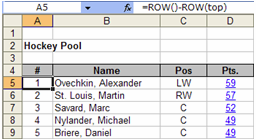
So, t.ex, if you have a list of names in column B, starting in cell B5 and you want line numbers in column A, it should be following =ROW()-4 In cell A5, and then copy the formula down the entire column A to the bottom of your list. So every fomel in column A will be =ROW()-4. ROW()-Part of the formula retunerar row number of the cell in which the formula . Since the number of lines before the first line is subtracted.

For example,: formula in cell A5 is = ROW()-4. ROW() returns 5 (IU. wheel 5) and subtraherar 4 gives 1 for your sequence numbers.
Once you delete a row in your data row numbers automatically adjusted throughout the table. When you add a row, all the row numbers automatically adjust when you have copied the formula from the cell above the new row.

There is a “plump” in this solution, however,.
If rows are deleted or that it adds to a series of (wheel 1 to 3 of this example) you will get the wrong values ​​in the row numbers. Here is the solution.

1) Choose a celll directly above the first row of your data (A4 in this example).

2) Give a name to the cell by typing a name in the Name box (IU. top) (the white bar immediately above cell A1)

3) No, use the same formula as above, replace 4 mot R0W(top).

Your new formula will now be: =ROW()-ROW(top)